Monday, 21 November 2011

Target Audience Survey

To find out what my target audience for my genre i created a survey, i did this by using a website called Survey Monkey. This website aloud me to create the survey easy and quickly.
Here is the link below, i sent the survey to a range of different people at different ages.

http://www.surveymonkey.com/s/FGD2YPS


Below you can see some of the results 


Thursday, 3 November 2011

Working With Photoshop

BOOK
First of all I placed a landscape image to be the background by simply moving around the layers. I then added in a wooden background behind the book for this to appear as a table for the book placed on

I added highlights and shadows to make the book look more 3D.

I cut out the contents of the book with the magic wand tool, and replaced it with grass. 


Here you can see my book finished, i added a road, trees, and put shadows in the correct places to look more realistic. This task has helped me become familiar with the program and i now feel i can comfortably use it. 

BLENDS_PHONE BOX

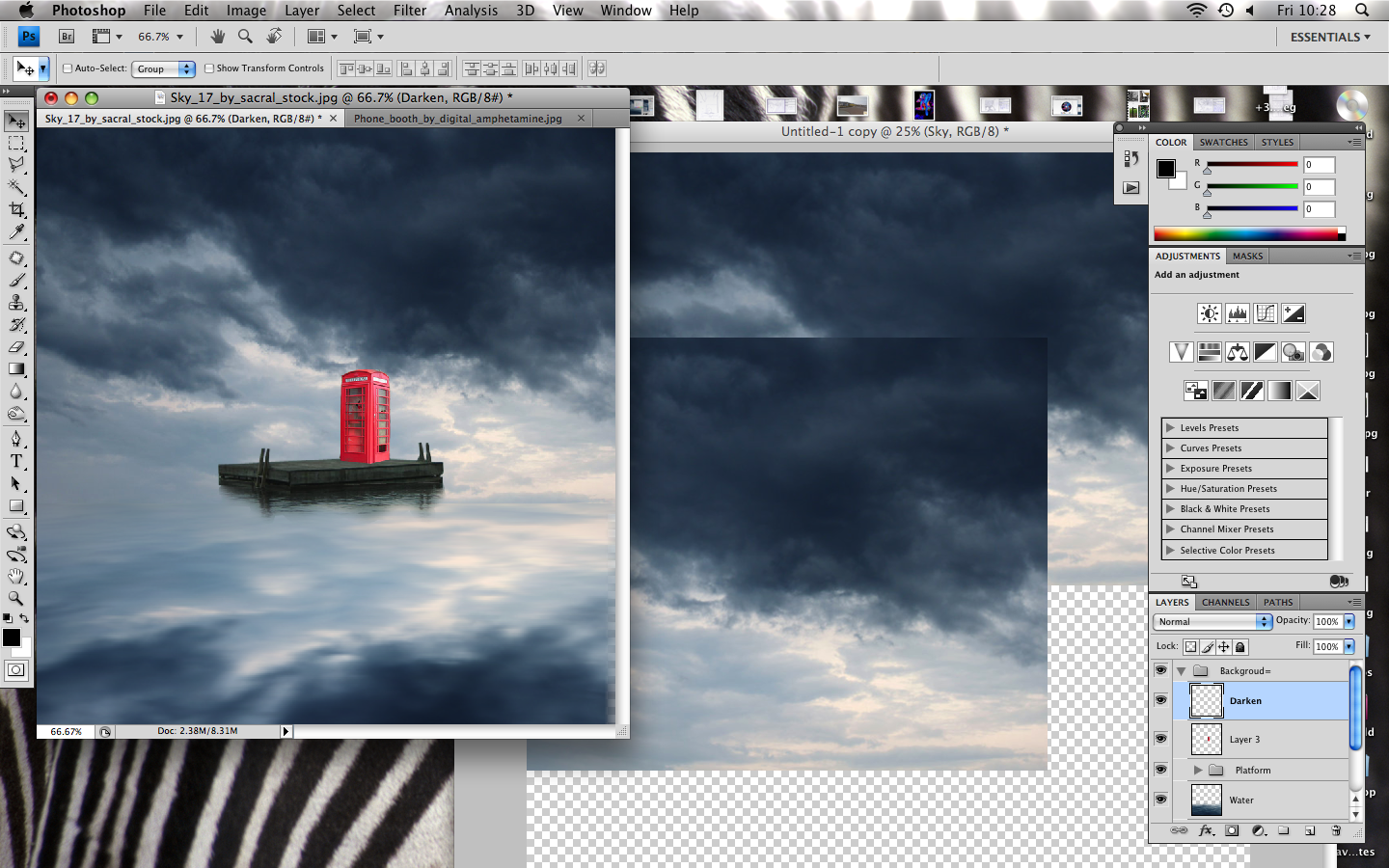
In this tutorial, I learned how to create a surreal image which also has to feel and look like a traditional image. I learned how to blend images together, use shadows and lighting and create reflections on photoshop and also how to blend textures together in order to enhance the image and make it look like a traditional painting.

Picture+36.png

First of all I had to create the sky with its reflection on the sea which will serve as the background of my picture. I made the reflection look realistic by adding a little Motion Blur.   

Picture+37.png

I then made the reflection on the sea more realistic by blending an image of the sea to it. Firstly I desaturate the water's colour in order to make it blend nicely with the sky and its reflection. Also, by using an Eraser tool i was able to make the horizon in this image look seamless

Picture+38.png

This is a screen shot of me desaturating the waters colour

Screen+shot+2011-11-23+at+18.34.01.png

I then added the platform to where the phone booth and the lost woman will be situated. In order to create its reflection in the water I activated the Polygonal Lasso Tool where could select the area and blend it in with the water to make it seamless. The result of erasing and reducing the Opacity is shown above

Picture+39.png

The next step was to create a phone booth to be positioned on the platform, i did this by selecting around the area i wanted to cut by using the Magnetic Lasso tool. I then adjusted the Brightness/Contrast of the layer and removed all the distracting plan on the booths lower area by using the Clone Stamp tool. 

Picture+40.png

This was the final image so far with the platform and phone booth. The next step was to create a reflection for the phone booth and then add on a woman to the image.

Monday, 10 October 2011

Locations, Props, Actors

Props

Costumes
As i will be using a recent song i think dressing my actress Hayley in high fashion clothes will make my video look more professional. I have used a site called Polyvore to create this collection of clothes you will be able to see below. 
I am hoping Hayley will be wearing something like this, i would like her to be wearing heavy make-up, and polished hair. This style goes with my R&B genre. 


Equipment 
 Going from left to right we used the DSLR Rig, monitor, dolly, lens, follow focus, apple mac, and the 7D camera. And at the bottom of the picture below, you can see the tripod.


Location


Jersey Town


Actors


I have held auditions to find an actress that would best suit my song and genre. 


This is Chelsea she is the first person i auditioned.  


Wednesday, 5 October 2011

InDesign Digipack practice

I have been working in InDesign, trying to get used to the program. Below you can see my digipak drafts. 


Two Door Cinema Club


Rihanna


Katy Perry


Tuesday, 4 October 2011

Initial Ideas

At this point i am swaying towards producing a R&B genre music video. I have an idea of a actor and locations. Researching into music videos has aloud me to see all the different genres song and the variety of very different videos. 
As you can see below, i have created a mind map of ideas. 


I want my video to look professional and well shot, it think by having the right location, actors and props will help with achieving this in my video. 
I like the idea of doing a time lapse in my video because of the song being upbeat, i was thinking of doing it from a high place (Fort Regent) looking down at town, capturing different and cars. When researching about time lapses i found this music video by OK go, you can see this below. 


Thursday, 29 September 2011

Ellie Goulding, Poster

Ellie Goulding, Poster


This poster is advertising Ellie Goulding as a successful artist. She is in the centre of the poster, depth of field is used to make her stand out against the dark background. This picture is a unconventional way of showing her profile, because she is looking up it draws the viewers attention to the typography at the top of the poster which is important as it states the artists name. A white font is used to advertise her name and success stories, this stands out in front of the dark background colours. Then there is a golden font which is thin which tells the viewers about her songs and comments from magazines and newspapers. I would like to also have my main artist in the centre of my poster having a dark background and using brighter font.  

Rihanna, Rated R- Poster

Rihanna, Rated R- Poster


This poster is advertising Rihanna's new album 'Rated R'. It is very basic, everything in black and white except from the red font at the bottom of the poster advertising bands she's worked with in the album. Different typography is used throughout the advert. Rihanna is wearing heavy make-up with black eyes and black lips. This is not her typical style, she is going with a grunge/ punk style compared with her girly, high fashion clothes. She takes up 75% of the poster, it look's like she is looking directly at you what draws the viewers in. In the top right conner is Rihanna's logo which is displayed on most of her cd's and posters. The picture has been edited to give a more of a glossy look.